#![doc(
html_logo_url = "https://github.com/wasmerio.png?size=200",
html_favicon_url = "https://wasmer.io/images/icons/favicon-32x32.png"
)]
#![deny(
missing_docs,
trivial_numeric_casts,
unused_extern_crates,
rustdoc::broken_intra_doc_links
)]
#![warn(unused_import_braces)]
#![cfg_attr(
feature = "cargo-clippy",
allow(clippy::new_without_default, clippy::vtable_address_comparisons)
)]
#![cfg_attr(
feature = "cargo-clippy",
warn(
clippy::float_arithmetic,
clippy::mut_mut,
clippy::nonminimal_bool,
clippy::map_unwrap_or,
clippy::print_stdout,
clippy::unicode_not_nfc,
clippy::use_self
)
)]
#![allow(deprecated_cfg_attr_crate_type_name)]
#![cfg_attr(feature = "js", crate_type = "cdylib")]
//! [`Wasmer`](https://wasmer.io/) is the most popular
//! [WebAssembly](https://webassembly.org/) runtime for Rust. It supports
//! JIT (Just In Time) and AOT (Ahead Of Time) compilation as well as
//! pluggable compilers suited to your needs.
//!
//! It's designed to be safe and secure, and runnable in any kind of environment.
//!
//! # Usage
//!
//! Here is a small example of using Wasmer to run a WebAssembly module
//! written with its WAT format (textual format):
//!
//! ```rust
//! use wasmer::{Store, Module, Instance, Value, imports};
//! use wasmer::FunctionEnv;
//!
//! fn main() -> anyhow::Result<()> {
//! let module_wat = r#"
//! (module
//! (type $t0 (func (param i32) (result i32)))
//! (func $add_one (export "add_one") (type $t0) (param $p0 i32) (result i32)
//! get_local $p0
//! i32.const 1
//! i32.add))
//! "#;
//!
//! let mut store = Store::default();
//! let module = Module::new(&store, &module_wat)?;
//! // The module doesn't import anything, so we create an empty import object.
//! let import_object = imports! {};
//! let instance = Instance::new(&mut store, &module, &import_object)?;
//!
//! let add_one = instance.exports.get_function("add_one")?;
//! let result = add_one.call(&mut store, &[Value::I32(42)])?;
//! assert_eq!(result[0], Value::I32(43));
//!
//! Ok(())
//! }
//! ```
//!
//! [Discover the full collection of examples](https://github.com/wasmerio/wasmer/tree/master/examples).
//!
//! # Overview of the Features
//!
//! Wasmer is not only fast, but also designed to be *highly customizable*:
//!
//! * **Pluggable compilers** — A compiler is used by the engine to
//! transform WebAssembly into executable code:
//! * [`wasmer-compiler-singlepass`] provides a fast compilation-time
//! but an unoptimized runtime speed,
//! * [`wasmer-compiler-cranelift`] provides the right balance between
//! compilation-time and runtime performance, useful for development,
//! * [`wasmer-compiler-llvm`] provides a deeply optimized executable
//! code with the fastest runtime speed, ideal for production.
//!
//! * **Headless mode** — Once a WebAssembly module has been compiled, it
//! is possible to serialize it in a file for example, and later execute
//! it with Wasmer with headless mode turned on. Headless Wasmer has no
//! compiler, which makes it more portable and faster to load. It's
//! ideal for constrainted environments.
//!
//! * **Cross-compilation** — Most compilers support cross-compilation. It
//! means it possible to pre-compile a WebAssembly module targetting a
//! different architecture or platform and serialize it, to then run it
//! on the targetted architecture and platform later.
//!
//! * **Run Wasmer in a JavaScript environment** — With the `js` Cargo
//! feature, it is possible to compile a Rust program using Wasmer to
//! WebAssembly. In this context, the resulting WebAssembly module will
//! expect to run in a JavaScript environment, like a browser, Node.js,
//! Deno and so on. In this specific scenario, there is no engines or
//! compilers available, it's the one available in the JavaScript
//! environment that will be used.
//!
//! Wasmer ships by default with the Cranelift compiler as its great for
//! development purposes. However, we strongly encourage to use the LLVM
//! compiler in production as it performs about 50% faster, achieving
//! near-native speeds.
//!
//! Note: if one wants to use multiple compilers at the same time, it's
//! also possible! One will need to import them directly via each of the
//! compiler crates.
//!
//! # Table of Contents
//!
//! - [WebAssembly Primitives](#webassembly-primitives)
//! - [Externs](#externs)
//! - [Functions](#functions)
//! - [Memories](#memories)
//! - [Globals](#globals)
//! - [Tables](#tables)
//! - [Project Layout](#project-layout)
//! - [Engines](#engines)
//! - [Compilers](#compilers)
//! - [Cargo Features](#cargo-features)
//! - [Using Wasmer in a JavaScript environment](#using-wasmer-in-a-javascript-environment)
//!
//!
//! # WebAssembly Primitives
//!
//! In order to make use of the power of the `wasmer` API, it's important
//! to understand the primitives around which the API is built.
//!
//! Wasm only deals with a small number of core data types, these data
//! types can be found in the [`Value`] type.
//!
//! In addition to the core Wasm types, the core types of the API are
//! referred to as "externs".
//!
//! ## Externs
//!
//! An [`Extern`] is a type that can be imported or exported from a Wasm
//! module.
//!
//! To import an extern, simply give it a namespace and a name with the
//! [`imports`] macro:
//!
//! ```
//! # use wasmer::{imports, Function, FunctionEnv, FunctionEnvMut, Memory, MemoryType, Store, Imports};
//! # fn imports_example(mut store: &mut Store) -> Imports {
//! let memory = Memory::new(&mut store, MemoryType::new(1, None, false)).unwrap();
//! imports! {
//! "env" => {
//! "my_function" => Function::new_typed(&mut store, || println!("Hello")),
//! "memory" => memory,
//! }
//! }
//! # }
//! ```
//!
//! And to access an exported extern, see the [`Exports`] API, accessible
//! from any instance via `instance.exports`:
//!
//! ```
//! # use wasmer::{imports, Instance, FunctionEnv, Memory, TypedFunction, Store};
//! # fn exports_example(mut env: FunctionEnv<()>, mut store: &mut Store, instance: &Instance) -> anyhow::Result<()> {
//! let memory = instance.exports.get_memory("memory")?;
//! let memory: &Memory = instance.exports.get("some_other_memory")?;
//! let add: TypedFunction<(i32, i32), i32> = instance.exports.get_typed_function(&mut store, "add")?;
//! let result = add.call(&mut store, 5, 37)?;
//! assert_eq!(result, 42);
//! # Ok(())
//! # }
//! ```
//!
//! These are the primary types that the `wasmer` API uses.
//!
//! ### Functions
//!
//! There are 2 types of functions in `wasmer`:
//! 1. Wasm functions,
//! 2. Host functions.
//!
//! A Wasm function is a function defined in a WebAssembly module that can
//! only perform computation without side effects and call other functions.
//!
//! Wasm functions take 0 or more arguments and return 0 or more results.
//! Wasm functions can only deal with the primitive types defined in
//! [`Value`].
//!
//! A Host function is any function implemented on the host, in this case in
//! Rust.
//!
//! Thus WebAssembly modules by themselves cannot do anything but computation
//! on the core types in [`Value`]. In order to make them more useful we
//! give them access to the outside world with [`imports`].
//!
//! If you're looking for a sandboxed, POSIX-like environment to execute Wasm
//! in, check out the [`wasmer-wasi`] crate for our implementation of WASI,
//! the WebAssembly System Interface.
//!
//! In the `wasmer` API we support functions which take their arguments and
//! return their results dynamically, [`Function`], and functions which
//! take their arguments and return their results statically, [`TypedFunction`].
//!
//! ### Memories
//!
//! Memories store data.
//!
//! In most Wasm programs, nearly all data will live in a [`Memory`].
//!
//! This data can be shared between the host and guest to allow for more
//! interesting programs.
//!
//! ### Globals
//!
//! A [`Global`] is a type that may be either mutable or immutable, and
//! contains one of the core Wasm types defined in [`Value`].
//!
//! ### Tables
//!
//! A [`Table`] is an indexed list of items.
//!
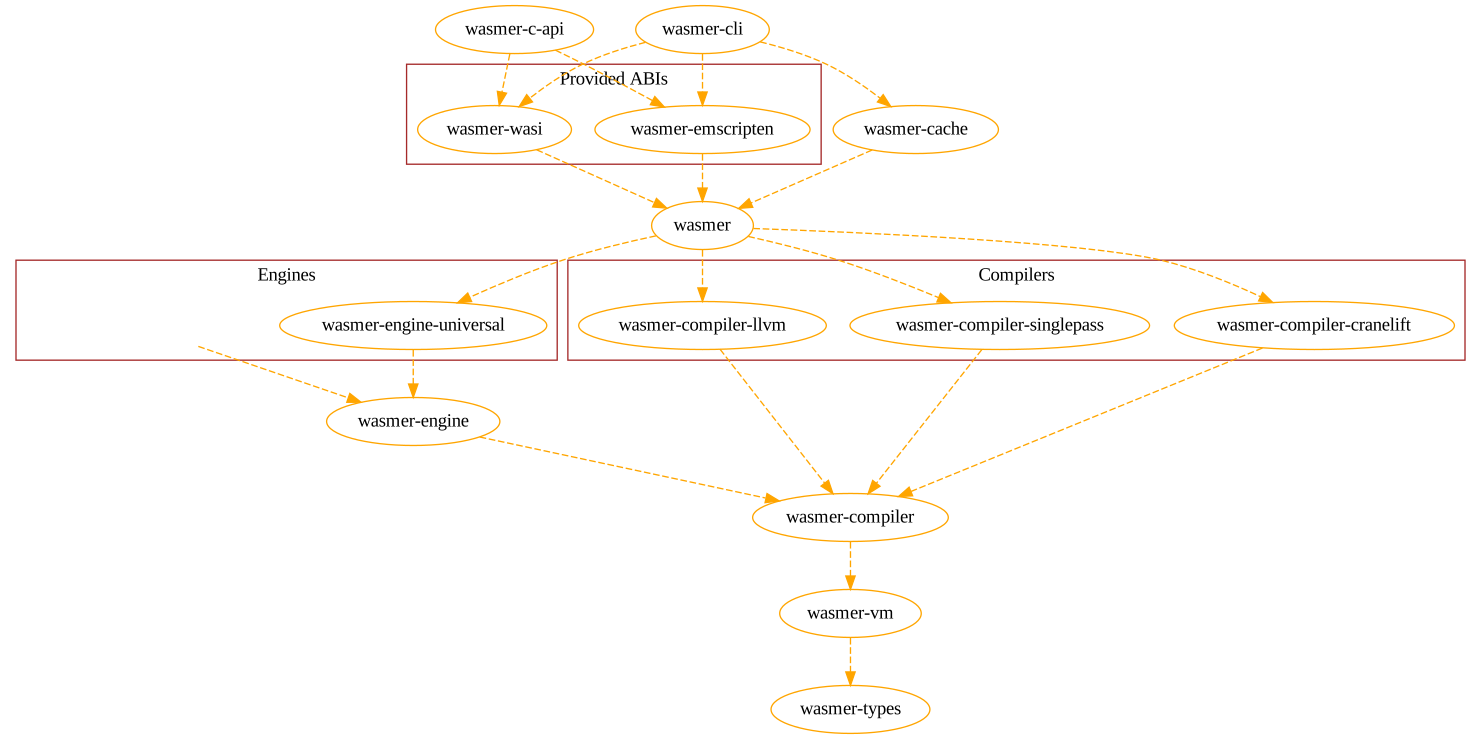
//! # Project Layout
//!
//! The Wasmer project is divided into a number of crates, below is a dependency
//! graph with transitive dependencies removed.
//!
//!
//!
//!